Showing posts with label tools. Show all posts

Monday, January 9, 2017

Alternate Uses for Muffin Tins

Around here we're always saying, "We need a tool that will do x. What do we already have that will serve the purpose or that we can alter to make it usable?" But there are plenty of objects we already own that can serve dual purposes. Take muffin tins for example:

Muffin Tin Monday - farm day

Although the muffin tin above is being used for food, there are no muffins in sight. (Note: Although the website this image linked to doesn't seem to be carrying on the Muffin Tin Monday posts--and the old ones appear to be gone--there are others online. In this image search for Muffin Tin Monday, I came up with all these images. Try the links or try to recreate these homemade bento boxes on your own). 

Still, there are other uses for muffin tins. Check out this video:
Or...use an old muffin tin to hold small amounts of different paints. 

Use one as a sorting tray when doing household or craft projects (screws, sequins or beads)

Have a casual dinner party and serve "Small Taste" meals with each person having their own muffin tin as a sampler plate.

Other suggestions? (I think I need one of those blue "tins" that aren't really tin. Too pretty).


Myrna


Friday, October 7, 2016

YouTube Tricks and Tools

It's been quite some time since I've posted a vlogbrothers video, but this one is just too useful. Here Hank tells viewers about ways to make your YouTube experience more interesting, useful, and satisfying. I knew about a few of these things, but there were a lot of them that I was unaware of. (If you have a problem viewing the embedded video below, here's the link).


If Hank was talking too fast for you, here's a link to an infographic that tells you some (not all) of what is in the video.

And if you're having trouble reading or saving that, here's an abbreviated list of shortcuts, not all of which are from this video:

YouTube Shortcuts

K – play/pause video
Left arrow – Go back 5 seconds
Control Left arrow – Go back 10 seconds
Right arrow – Skip forward 5 seconds
Control Right arrow – Skip forward 10 seconds
0 – Restart video
1, 2, 3 and so on – Move ahead 10%, 20%, 30% and so on
End – Skip to end of video
M – Mute/unmute
Up arrow – Raise volume 5%
Down arrow – Lower volume 5%
C – Toggle closed captioning
+ – Increase CC size
-  – will Decrease CC size
< – Lower speed
>  – Increase speed
hit pause (k), then the period or comma key to advance forward or back one frame at a time

You may already know all of these things, but if you don't, I hope you find them helpful. Also, as noted elsewhere, these may not work on all browsers. For example, I couldn't get the Control Left arrow or Control right arrow skip forward or back 10 seconds to work for me. 

Have a great day!

Myrna

Thursday, February 28, 2013

When the Power Goes Out and You Don't Have a Candle, Try This

Twice this week I've seen ideas (good ideas) on how to deal with a power outage. So I'm sharing.

In the video below, Grant Thompson shows you how to make a candle from a simple stick of butter.
butter 


And here's a link to a great milk jug lantern, using only a milk carton, some water and a camping-style headlamp. (Note: this was presented not as an emergency lamp, but as a reading lamp, which makes it doubly great in my opinion).

Aren't these great?

Friday, December 28, 2012

A Useful Little Stapler

I saw this stapler featured in a longer video the other day and wondered why I'd never seen one in the stores. I can't tell you how many times I've wanted to staple a booklet but didn't want to pay money for a longer one just for those rare "booklet moments."


(After watching this, I looked everywhere on the Internet and could only find these for sale on ebay. They're made in Japan, but I wonder why they're not more readily available. I think they may need special staples, but then so do those super small staplers. If anyone knows why these aren't widely distributed, I'd love to know the reason).

Friday, July 13, 2012

Writing Jumpstarter: Concentrate on Visuals

One day last year while I was in the midst of writing The Rancher's Unexpected Family, part of the Larkville Legacy series, my editor asked me to submit artwork info for a Christmas novella I was scheduled to write. And there was a ticking clock.

I, of course, agreed. There was only one problem. The novella wasn't due to be written until after I was through with the Larkville book and I hadn't yet decided what it would be about...or what the characters would be like...or what their conflict was...or even what their names were. (I knew that it was about Christmas and that there would be a puppy in the mix. That was all).

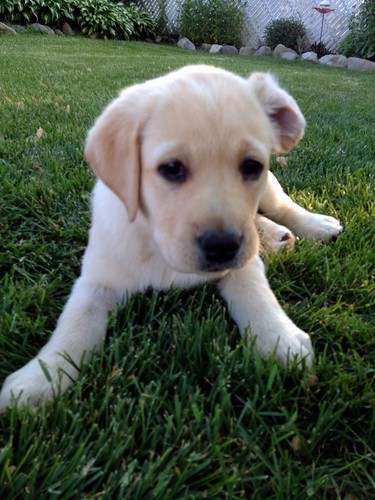
(Note: This isn't the puppy from the novella, but she certainly could have been. The point is that I can totally see looking at this photo and finding myself beginning a story. Images can be powerful story starters).

 So, I started looking at images. Puppy images, hero images, heroine images, house images, anything that I found remotely interesting. And that was when the magic began to happen. Now I had characters and a setting. I could give them names. I could explore their issues. And since this was for art purposes, I could come up with a few visually interesting scene possibilities.

With that as my starting point, I sat down and wrote a rough outline of the book. It was enough for the artist to work from. But the wonderful thing was that when I finished The Rancher's Unexpected Family I had a good starting place for what would end up being The Soldier, the Puppy and Me. Sure, some things changed. The book evolved as I was writing it, but then...books always do that (at least mine do). A story is fluid until the day I stop editing it and it finally "feels" finished.

But being forced to search for images before I was ready to even begin plotting was a novel experience for me. It's not the way I usually work. I like to at least have the basics nailed down before I go on an image hunt, but I certainly could see trying this again someday. In this case, having images to get the party started was just what I needed.